
Social Media Marketing Neukundengewinnung über Social Media
Mehr Neukunden als je zuvor – wir zeigen Ihnen, wie!
So gelingt Online-Neukundengewinnung
In den sozialen Medien begegnen Sie Ihrer Zielgruppe dort, wo sie sich am liebsten aufhält. Über Lookalike Audiences sprechen Sie präzise die richtigen Personen an. Bedürfnisorientierter, relevanter Content erreicht eine hohe Conversion und minimiert Streuverluste. Sie importieren Leads in Echtzeit über die Zapier-Schnittstelle direkt in BSI CX und motivieren neue Interessenten mit personalisierten Botschaften zum Start ihrer Customer Journey.
Social Media Marketing Whitepaper: So gelingt Online-Neukundengewinnung im Einzelhandel
Wer seine Customer Journey effektiv aufsetzt, kann dank Kundensegmentierung und Omnichannel Marketing so erfolgreich bei der Lead-Generierung sein wie nie. Wir zeigen Ihnen, wie Sie die fünf Herausforderungen beim Social Media Marketing bewältigen können, wie Sie Ihre Marketing Audience identifizieren und was Ihr Tech Stack können muss.

Kundenselektion und Lookalike Audience Zielgerichtet finden Sie Zwillinge Ihrer besten Kunden
Indem Sie die Top-Kunden identifizieren, können Sie mit BSI CX gezielt Personen mit den gleichen Merkmalen finden. Im CRM selektieren Sie Ihre Wunschkunden. Diese Profile exportieren Sie auf die gewünschten sozialen Plattformen wie Facebook. So erstellen Sie eine Lookalike Audience, über die Sie statistische Zwillinge Ihrer Lieblingskunden ansprechen, für die Ihr Angebot besonders attraktiv ist.
Personalisierte Ads ausspielen Versorgen Sie Ihre Zielkunden mit relevantem Content
Durch die selektierten Daten kennen Sie die Interessen, Wünsche und Bedürfnisse Ihrer Audience bis ins Detail. Sie wissen sogar, in welchem Stil und Tonfall Ihr Publikum sich relevanten Content wünscht. So senden Sie zielgerichtete Botschaften, die ihre Zielgruppe passgenau anspricht.
Omnichannel Auf allen Kanälen sichtbar
Ihre Kunden wechseln flüssig zwischen verschiedenen Kanälen. Dank BSI CX wissen Sie, welcher Kanal zu welcher Zeit bevorzugt wird. Mit einer Omnichannel-Strategie sind Sie überall dort präsent, wo Ihre Zielgruppe sich gern aufhält. Sie begegnen Ihren zukünftigen Top-Kunden dort, wo sie zu Hause sind.
Streuverluste minimieren Durch hochgradige Personalisierung Conversion steigern
Sie verzichten auf breit gestreuten Content, der nur geringfügig konvertiert. So vermeiden Sie die Gefahr, dass Sie Ihre Wunschkunden durch irrelevante Inhalte verärgern. Stattdessen senden Sie hochgradig personalisierte Inhalte und schaffen ein hohes Identifikationspotenzial. Damit steigt die Wahrscheinlichkeit, dass Kunden aktiv und interessiert auf Ihre Ad reagieren.
Daten im CRM direkt verfügbar Automatischer Import mit Zapier-Schnittstelle
Über die Zapier-Schnittstelle werden relevante Facebook-Nutzerdaten bei Klick auf eine Ad direkt ins BSI CX übermittelt. Durch die Vollintegration des CRM in der BSI Customer Suite stehen Ihnen Vorname, Nachname und E-Mail-Adresse des neuen Interessenten in Echtzeit zur Verfügung. Damit startet eine neue Customer Journey.
Gewusst?
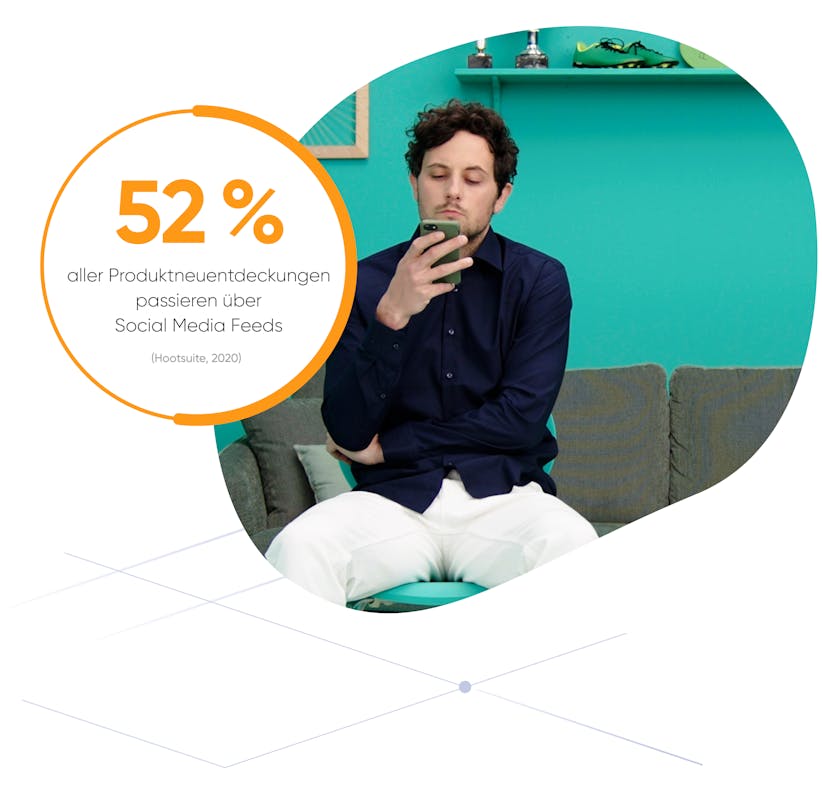
Mehr als die Hälfte aller Produktneuentdeckungen passieren über Social Media Feeds (Hootsuite, 2020).
Mit Social Media Management sprechen Sie Ihre Wunschkunden präzise an
Ein Beispiel: Story «Beginn einer Customer Journey»
Tim ist Ihr Lieblingskunde. Er bringt viel Umsatz und liebt Ihre Produkte. Das Beste, was Ihnen passieren kann, sind mehr Kunden wie Tim: Kunden mit genau den Merkmalen, die Ihren Lieblingskunden so wertvoll machen.
Sie könnten aufs Geratewohl Ads schalten und hoffen, dass jemand wie Tim unter den Empfängern ist. Oder Sie gehen gezielt auf die Suche nach genau den richtigen Personen. Diese laden Sie mit maximal relevanten und attraktiven Botschaften ein, Kontakt aufzunehmen.
Die Selektion von Tims Kundendaten exportieren Sie auf die gewünschten sozialen Plattformen, wie zum Beispiel Facebook. Nun können Sie Tims statistische Zwillinge auf die gleiche Weise ansprechen, die ihn immer wieder begeistert.
Einer dieser Zwillinge ist Max. Er sitzt auf seinem Sofa und surft auf dem Tablet durch seine sozialen Kanäle. Ihre Werbung erscheint und interessiert ihn sofort, weil der Content perfekt auf ihn abgestimmt ist. Max klickt auf die Ad, wird direkt weitergeleitet und seine Daten werden über die Schnittstelle direkt ins BSI CX übermittelt.
Direkt im Anschluss erhält er automatisch eine personalisierte E-Mail, die den Content für ihn noch weiter vertieft und attraktive Vorteile in Aussicht stellt. Max ist überzeugt und brennt darauf, seine Customer Journey mit Ihrer Marke zu beginnen.
Neukunden mit hoher Conversion und minimalen Streuverlusten
Mit BSI CX erzeugen Sie einfach Selektionen der Kunden, die Sie neu hinzugewinnen möchten. Social-Media-Plattformen bieten damit eine hervorragende Grundlage für eine perfekt gestaltete Lookalike Audience. Sie senden ausschliesslich relevante Inhalte, haben minimale Streuverluste und eine hohe Conversion Rate. Mit Ihrer Omnichannel-Strategie erreichen Sie zufriedene Konsumenten mit Inhalten, die haargenau auf sie zugeschnitten sind und ihre Interessen optimal bedienen. Jeder neue Lead gelangt direkt ins CRM und löst automatisch eine neue, personalisierte Customer Journey aus.
Überrascht?
Bei 1/4 aller Nutzer, die eine Social Media Ad gesehen haben, liegt die Kaufwahrscheinlichkeit bei bis zu 50 %. (Statista, 2020)
Related Capabilities
Interesse geweckt?
Wir zeigen Ihnen, wie BSI auch Ihnen helfen kann.